
NTLM stands for NT LAN Manager. Windows uses this protocol for authentication when Kerberos fails or legacy systems exist. Modern Active Directory relies on Kerberos for normal domain logon and access. NTLM remains mainly for backward compatibility.
NTLM exists in multiple versions. Version 1 relies on weak cryptography and outdated hashing. Version 2 improves security but still lacks modern protections. Security reviews regularly flag NTLM v1 due to credential replay and lateral movement risk.
Modern Windows 10 and Windows 11 workstations do not require NTLM v1. Removing this protocol reduces risk and exposes hidden legacy dependencies early.
Why NTLM v1 Gets Blocked
NTLM v1 presents clear security issues. Password hashes face easier capture and reuse. Attackers often abuse NTLM v1 during internal movement after initial access. Many offensive tools rely on NTLM weaknesses.
Blocking NTLM v1 on workstations delivers fast risk reduction with low operational impact. Kerberos continues to handle default domain authentication. NTLM v2 remains available during transition.
Change Goal
The objective focused on workstation hardening. NTLM v1 removal needed to occur without disrupting user logon or normal domain operations. The environment contained mostly Windows 10 and Windows 11 desktops. Servers stayed outside scope during the first phase.
Workstations provided the safest starting point for enforcement and observation.
Approach
Group Policy delivered controlled rollout and rollback. A dedicated policy targeted only workstation objects. Domain controllers and servers stayed excluded to avoid domain-wide impact.
Auditing preceded enforcement. Visibility came first. Blocking followed after validation.
Group Policy Design
Create a new Group Policy Object scoped to workstation OUs or a workstation security group.
Policy name example: Disable NTLMv1 on Workstations
Required settings
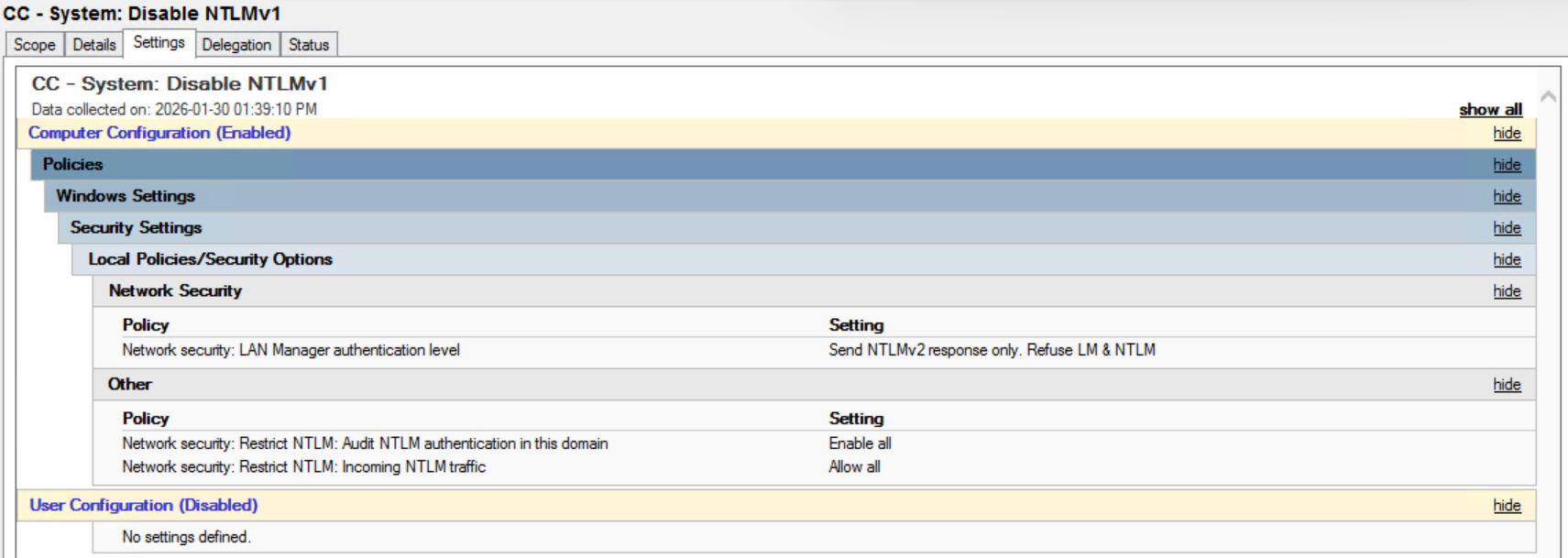
LAN Manager authentication level
Path
Computer Configuration \ Policies \ Windows Settings \ Security Settings \ Local Policies \ Security Options
Setting
Network security. LAN Manager authentication level
Value
Send NTLMv2 response only. Refuse LM and NTLM

Result
LM and NTLM v1 stop functioning. NTLM v2 remains available. Kerberos stays preferred.
NTLM auditing
Path
Computer Configuration \ Policies \ Windows Settings \ Security Settings \ Local Policies \ Security Options
Setting
Network security. Restrict NTLM. Audit NTLM authentication in this domain
Value
Enable auditing for all accounts

Result
Visibility into NTLM usage across the environment.
Incoming NTLM traffic
Path
Computer Configuration \ Policies \ Windows Settings \ Security Settings \ Local Policies \ Security Options
Setting
Network security. Restrict NTLM. Incoming NTLM traffic
Value during observation
Allow all

Result
No authentication disruption during monitoring.
Settings intentionally excluded
Domain-wide NTLM enforcement
Domain controller scoped NTLM deny rules
Such controls belong in separate domain controller policies.
Deployment
Link the policy to workstation scope only. Validate exclusion of servers and domain controllers. Test on a small workstation sample. Confirm user logon, network access, and Group Policy processing. Expand rollout to all workstations after validation.
Monitoring and Validation
Domain controller security logs provide confirmation. NTLM authentication events reveal hostnames and applications. Windows workstations continue using Kerberos under normal conditions. Legacy dependencies surface quickly.
Issue Handling
Each failure maps to an application or device owner. Authentication methods require upgrade to Kerberos or NTLM v2. Any exception stays scoped, documented, and time-limited.
Follow-Up Hardening
After several clean days of logs, tighten controls further. Change Incoming NTLM traffic to Deny all domain accounts on workstations. Servers follow later under a separate plan.

Outcome
NTLM v1 removal completes on workstations. Default domain authentication continues without disruption. Audit visibility improves. Attack surface shrinks with minimal operational risk.
This process offers a practical first step toward modern Active Directory hardening.